
Convert to DXF
Brief
The Convert to DXF tool can convert LiData format point cloud files to point vector data in DXF format. LiPowerline software exports DXF files in ASCII format.
Usage
Click Data Management > Conversion > Convert to DXF
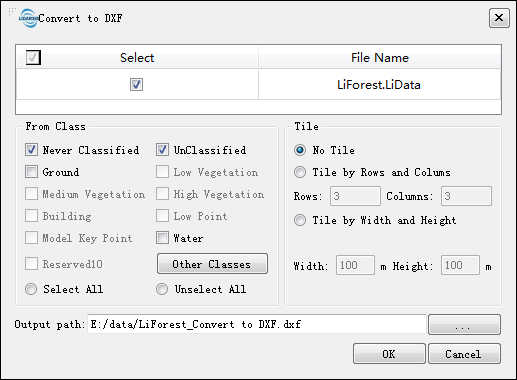
Settings
- Input Data: The input file can be a single point cloud data file or multiple data files. File Format: *.LiData.
- From Class: Source class (es).
- Tile: Since the amount of point cloud data is often large, the software provides an optional tile mode that can split the input data file to a number of tiles.
- No Tile: Export a single DXF file.
- Tile by Rows and Columns: According to the boundary of the point cloud data, the point cloud will be split into a total number of rows * columns data blocks evenly, and a single DXF file will be generated.
- Rows (default value is "3"): User-defined number of rows that the point cloud want to be split into.
- Columns (default value is "3"): User-defined number of columns that the point cloud want to be split into.
- Tile by Width and Height: The point cloud will be split into a number of tiles from the lower left corner by the specified width and height, one DXF file per block.
- Width (m, default value is "100"): User-defined block width.
- Height (m, default value is "100"): User-defined block height.
- Output path: Path of the output folder where the converted new file(s) will be generated.