
Generate Report UI
Summary
The UI for report generating.
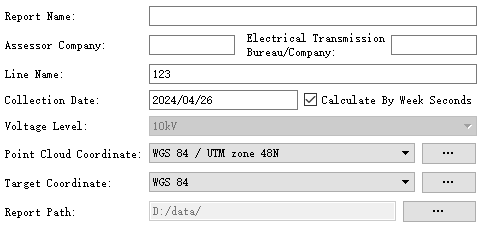
Settings
- Report Name: The title of the report.
- Assessor Company: The company which generates the report.
- Electrical Transmission Bureau/Company: The name of power supply bureau or company.
- Line Name: Line name.
- Collection Date: The date on which point cloud was collected.
- Calculate By Week Seconds: Point cloud collection time is calculated by weeks seconds.
- Voltage Level: Cannot be changed by user.
- Point Cloud Coordinate: The point cloud coordinate system used in the report.
- Target Coordinate: The coordinate system used in the report.
- Report Path: The output path of the report.