
Generate Trajectory By Model
Summary
The generating trajectory on model menu is shown in the following figure, includes Generate Trajectory By Model, Batch Generate Trajectory Based On Model.
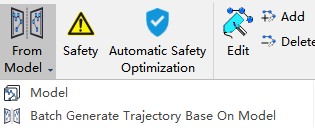
Generate Trajectory By Model

After generating the trajectory model, it is necessary to mark part points for towers that will use the model. All part points should be marked according to the inspection configuration of the same tower type, and the quantity and positions of these part points must remain consistent with the trajectory model.
Usage
Click Fine Inspection > Trajectory > From Model
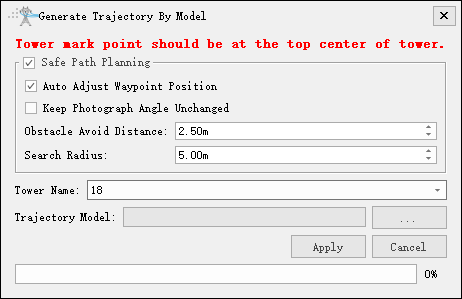
- Safe Path Planning: Set whether to perform safe path planning.
- Auto Adjust Waypoint Position: Set whether to automatically adjust waypoint positions.
- Keep Photograph Angle Unchanged: Set whether to keep the camera angle unchanged.
- Obstacle Avoid Distance(m)(default value "2.5"): Set the obstacle avoidance distance.
- Search Radius(m)(default value "5"): Set the search radius.
- Tower Name: Select the tower.
- Trajectory Model: Select the trajectory model file.
Batch Generate Trajectory Based On Model
After generating the trajectory model, you need to perform part point marking operations on the towers that apply the model. Mark all part points according to the inspection configuration of the same tower type, ensuring that the quantity and positions of part points remain consistent with the trajectory model.
Usage
Click Fine Inspection > Trajectory > Batch Generate Trajectory Base On Model
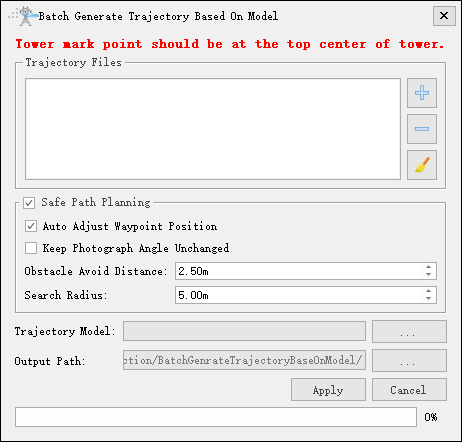
- Trajectory Files: Maintain the trajectory file with part points that needs trajectory generation based on the model, and ensure the tower type is consistent with the model.
- Safe Path Planning: Set whether to perform safe path planning.
- Auto Adjust Waypoint Position: Set whether to automatically adjust waypoint positions.
- Keep Photograph Angle Unchanged: Set whether to keep the camera angle unchanged.
- Obstacle Avoid Distance(m)(default value "2.5"): Set the obstacle avoidance distance.
- Search Radius(m)(default value "5"): Set the search radius.
- Tower Name: Select the tower.
- Trajectory Model: Select the trajectory model file.