
Wind Turbine Tower Inclination Analysis
Summary

This function is mainly used to automatically analyze and calculate the inclination of the wind turbine tower, and generate analysis reports. The functional interface is shown in the following figure, which can process multiple data simultaneously. Click to add pending data, click
 to remove the selected data, click
 to clear the data list.
Usage
Click Completion Analysis > Other > Wind Turbine Tower Inclination
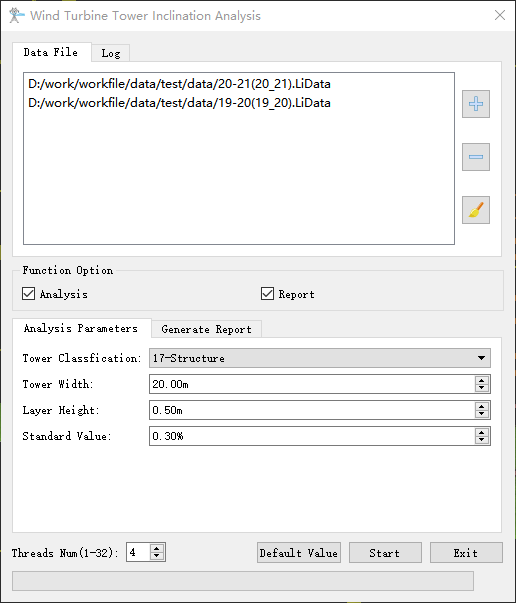
Parameter Settings
- Analysis: Selected by default. Select to analyze the inclination of the wind turbine tower; If not selected, do not analyze.
- Tower Classification(default value is "18"): Set the category of the wind turbine tower.
- Tower Width(m)(default value is "20"): Set the tower width to set the range of sampling points. The software can record the user's current settings.
- Layer Height(m) (default value is "0.5"): Set the tower analysis layer height to extract the point cloud data to be calculated. The software can record the user's current settings.
- Standard Value(default value is "0.3"): Set the standard inclination ratio for wind turbine towers to determine if the tower's inclination exceeds the specified limits. The software can record the user's current settings.
- Generate report: Selected by default.If this parameter is selected, an analysis report is generated based on the analysis result file. If unchecked, no report will be generated.
- Assessor Company: The company that generated the report.
- Electrical Transmission Bureau/Company: The name of the power supply bureau.
- Line Name: Line name.
- Target Coordinate: The coordinate system used in the report.
- Report Path: Report output path.
- Threads Num(The default value is "4"): Set the number of threads. 1-32 threads can be supported. The software can record the user's current settings and automatically restore the settings when it is turned on again.