
Generate Trajectory With Interactive Method
Summary

Pick the photo point with the mouse, and then add waypoints based on the scene direction to generate trajectory.
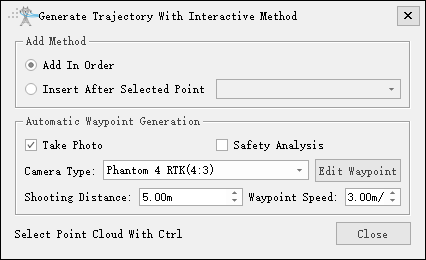
- Add Method: Set the order of waypoint addition.
- Add In Order: After selecting, add waypoints in order.
- Insert After Selected Point: After selecting, insert a waypoint after the selected waypoint.
- Automatic Waypoint Generation:
- Take Photo: Check to generate waypoints with photo information. Uncheck to generate auxiliary waypoints and tower crossing waypoints, etc.
- Safety Analysis: Check to perform real-time safety analysis when adding waypoints.
- Camera Type: Set the camera type. By default, it is read from the camera configuration.
- Edit Waypoint: Click to jump to the edit waypoint function.
- Shooting Distance: Set the distance from the waypoint to the photo point.
- Waypoint Speed: Set waypoint speed.
- Select Point Cloud With Ctrl: Click the Ctrl key to pick up the photo point again with the mouse and modify the current waypoint position.