
File Operation
The fine inspection file menu is shown in the following figure, including functions such as "Open", "Save", "Auto Save", "Split", and "Merge".
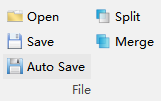
Open

Open the .json format trajectory file.
Save

Save the .json format trajectory file. By default, it is saved as the trajectory .json file in the fine inspection folder under the working directory.
Auto Save

Save the .json format file. By default, it is saved as the trajectory .json file in the fine inspection folder under the working directory.
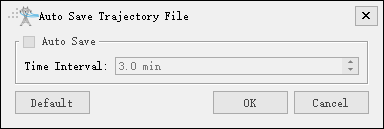
- Auto Save(Check by default): If checked, the trajectory file will be automatically saved every time interval.
- Time Interval(3.0 minute by default): Set the time interval value.
- Default: Modify all parameters to default values.
Split

Split the trajectory file in .json format according to the selected waypoint.
Merge

Merge .json format trajectory files.
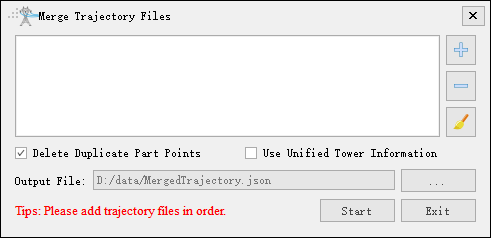
- Delete Duplicate Part Points(Check by default): If checked, delete duplicate part points.
- Use Unified Tower Information(Uncheck by default): If checked, use the tower information of the first part point uniformly.
- Output File: Set the path for saving trajectory.