
Goto
Summary

This function is used to redirect the current scene view to the input target coordinate position.
Usage
Click Measurement > Goto
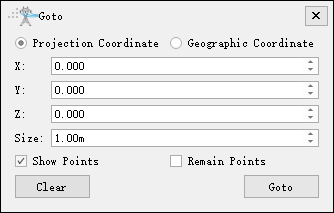
Set Parameter
- Coordinate reference: The default is the projection coordinate system, which supports latitude and longitude geographic coordinates. Select the coordinate reference type used for coordinate jump.
- Size: After jumping to the target position, draw the radius size of the ball at that coordinate.
- Show Points: Checked by default, the ball will be drawn at the coordinate position after jumping; Uncheck and the ball will not be displayed.
- Remain Points: Not checked by default. If checked, the previously drawn ball will be retained when jumping coordinates continuously.
- Clear: Click to clear the coordinate jump ball drawn in the scene.
- Goto: After clicking, the scene jumps to the position corresponding to the input coordinates and draws a small ball according to the specified size.
Steps
- After enabling the jump tool, select the target coordinate reference system, enter the 3D coordinates, and click "Jump" to jump to the corresponding position.