
Insulator Analysis
Summary

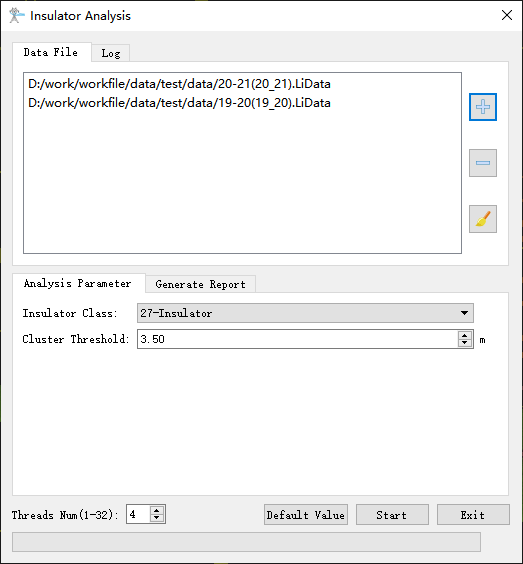
This function is used to calculate the inclination information of insulators in power lines and generate analysis reports. This function requires classification of insulators in advance. The function interface is shown in the figure below. This function can process multiple data at the same time. Click to add pending data, click
 to remove the selected data, click
 to clear data list.
Usage
Click Completion Analysis > Insulator
Settings
- Insulator Class(default value is "27"): Class number of insulators in point cloud data.
- Cluster Threshold(m)(default value is "3.5"): The maximum spatial distance for clustering insulator point cloud data. Insulators with distances less than this threshold will be grouped into the same cluster.
- Generate Report: This option is checked by default. If this option is checked the analysis report will be generated; if the option is unchecked, the analysis report will not be generated.
- Assessor Company: The company which generates the report.
- Electrical Transmission Bureau/Company: The name of power supply bureau or company.
- Line Name: Line name.
- Target Coordinate: The coordinate system used in the report.
- Report Path: The output path of the report.
- Threads Num(default value is "4"): Set the number of threads (1 to 32) to run this function. The software can record the current settings and when the user opens this function again, the setting will be kept.