
Trajectory Operation
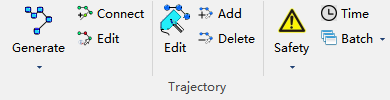
Generate

Generate substation trajectory based on selected part points, and automatically adjust trajectory safety.
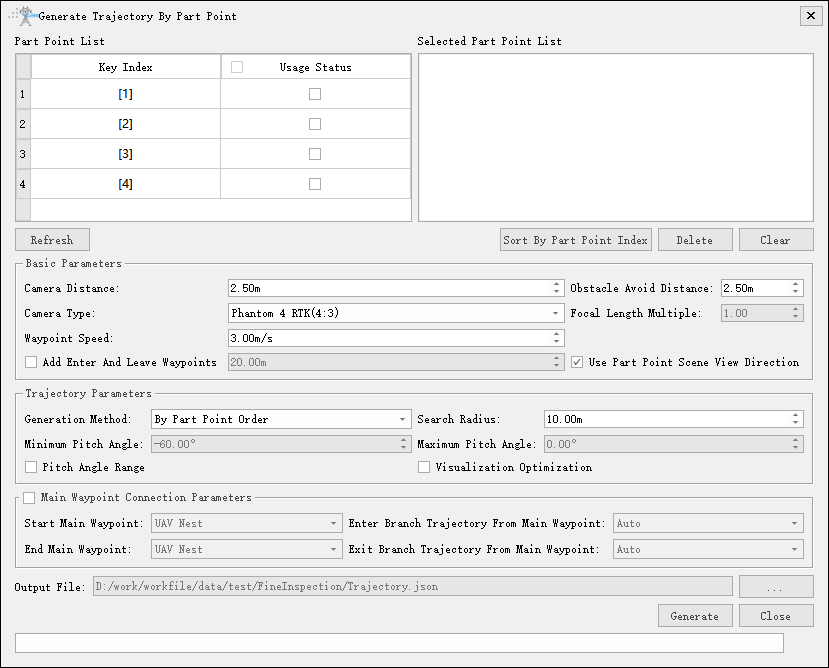
Basic Parameters
- Camera Distance(m)(default is "2.50"): Set the distance from waypoint to part point.
- Obstacle Avoid Distance(m)(default is "2.50"): Set the obstacle avoid distance.
- Camera Type: Set the photo camera type.
- Focal Length Multiple: Set the focal length multiplier, and select the zoom camera if available.
- Waypoint Speed(m/s)(default is "3.00"): Set the flight speed.
- Add Enter And Leave Waypoints(m)(default is "20.0"): Not checked by default. When checked, set the vertical distance for lifting enter and leave waypoints.
- Use Part Point Scene View Direction: When checked, use the scene direction corresponding to adding part points to generate waypoints. Can update direction in the Part Point Modify function.
Trajectory Parameters
- Generation Method: The generated trajectory will automatically add auxiliary points according to safety distance to ensure trajectory safety.
- By Part Point Order: Generate the trajectory according to the part point order in the part point list on the right.
- Automatically Adjust Order: Based on the part point list on the right, fix the waypoints of the start and end part points, automatically adjust the waypoint order of other part points and generate the trajectory.
- Search Radius(m)(default is "10.0"): Waypoint adjusts position within the spherical space of search radius. The larger the search radius, the larger the space for waypoint adjustment.
- Minimum Pitch Angle: Sets the minimum pitch angle.
- Maximum Pitch Angle: Sets the maximum pitch angle.
- Pitch Angle Range: Checking this option allows adjustment of the pitch angle range.
- Visibility Optimization: When checked, adjust waypoint positions according to visibility between waypoints and part points.
- Generation Method: The generated trajectory will automatically add auxiliary points according to safety distance to ensure trajectory safety.
Main Waypoint Connection Parameters
- Start Main Waypoint: When using main trajectory, select main waypoint as takeoff point.
- End Main Waypoint: When using main trajectory, select main waypoint as landing point.
- Enter Branch Trajectory from Main Waypoint: Auto (default), or you can select other main waypoints.
- Exit Branch Trajectory from Main Waypoint: Auto (default), or you can select other main waypoints.
Generate Initial Trajectory
Generate substation trajectory. All waypoints are connected according to the addition order of corresponding part points, facing the center of all part points.
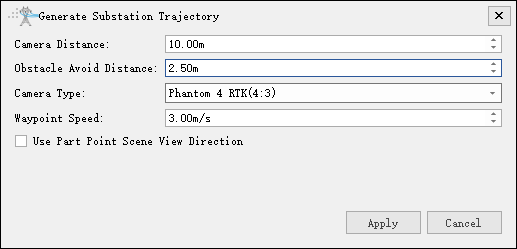
- Camera Distance(m)(default is "10.00"): Set the distance from waypoint to part point.
- Obstacle Avoid Distance(m)(default is "2.50"): Set the obstacle avoid distance.
- Camera Type: Set the photo camera type.
- Waypoint Speed(m/s)(default is "3.00"): Set the flight speed.
- Use Part Point Scene View Direction: When checked, use the scene direction corresponding to adding part points to generate waypoints. Can update direction in the Part Point Modify function.
Automatically Adjust Waypoint Position
Automatically adjust waypoint positions according to set parameters to make waypoints meet obstacle avoid distance. Waypoint connections will not be adjusted.
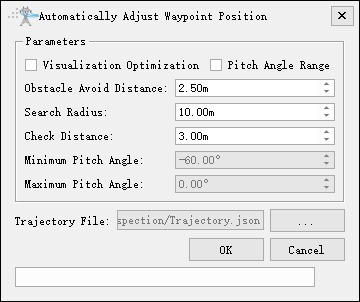
- Visibility Optimization: When checked, adjust waypoint positions according to visibility between waypoints and part points.
- Pitch Angle Range: Checking this option allows adjustment of the pitch angle range.
- Obstacle Avoid Distance(m)(default by "2.50"): Minimum safe distance allowed between waypoint and substation point cloud.
- Search Radius(m)(default by "10.0"): Waypoint adjusts position within the spherical space of search radius. The larger the search radius, the larger the space for waypoint adjustment.
- Check Distance(m)(default by "3.0"): If the offset distance after waypoint adjustment is greater than the check distance, a prompt will be given.
- Minimum Pitch Angle: Sets the minimum pitch angle.
- Maximum Pitch Angle: Sets the maximum pitch angle.
Generate Trajectory by Waypoint
Generate substation trajectory according to the corresponding waypoints of selected part points. The generated trajectory will automatically add auxiliary points to ensure trajectory safety. There are two modes for selecting part points: one is according to the part point list, and the other is according to the substation account information of part points. The default is according to the part point list mode. You can check "Use Substation Account" in "Substation Inspection Configuration" and select the corresponding substation to switch modes.
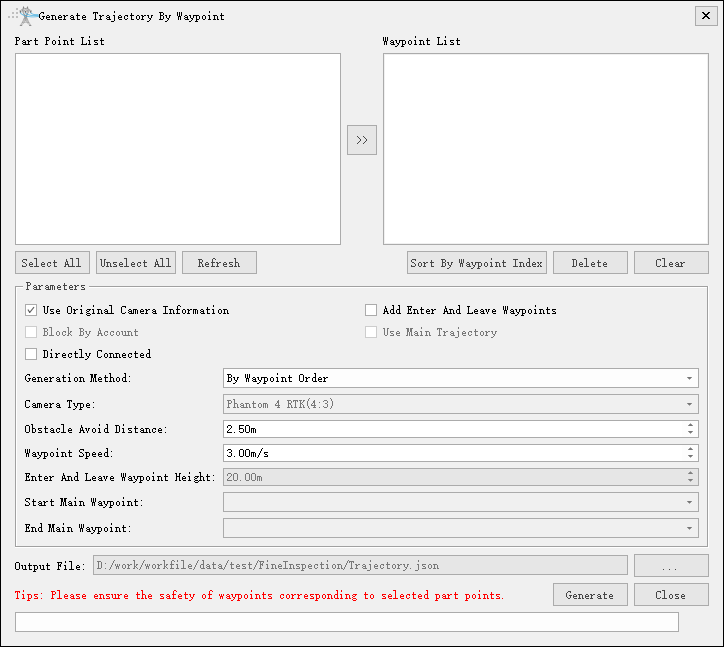
- Generation Method: The generated trajectory will automatically add auxiliary points according to safety distance to ensure trajectory safety.
- By Waypoint Order: Connect waypoints according to the order of the selected list on the right.
- Automatically Adjust Waypoint Order: After fixing the first and last waypoints in the selected list on the right, adjust other waypoint orders according to the global shortest path principle to generate the shortest path.
- Camera Type: Set the photo camera type.
- Obstacle Avoid Distance(m)(default is "2.50"): Minimum safe distance between waypoint and substation point cloud.
- Waypoint Speed(m/s)(default is "3.00"): Speed to fly to the next waypoint.
- Enter And Leave Waypoint Height(default is "20"): Relative height of enter and leave waypoints to adjacent waypoints, also called lift height.
- Start Main Waypoint: When using main trajectory, select main waypoint as takeoff point.
- End Main Waypoint: When using main trajectory, select main waypoint as landing point.
- Use Original Camera Information: When checked, use camera information in original waypoints; when unchecked, reset according to camera type.
- Add Enter And Leave Waypoints: Add enter and leave waypoints at the beginning and end of waypoints.
- Block by Account: Block selected part points according to substation account partitions and interval levels.
- Use Main Trajectory: When checked, connect the calculated trajectory with the main trajectory and generate a new trajectory.
- Directly Connected: Waypoints are directly connected without obstacle avoidance analysis.
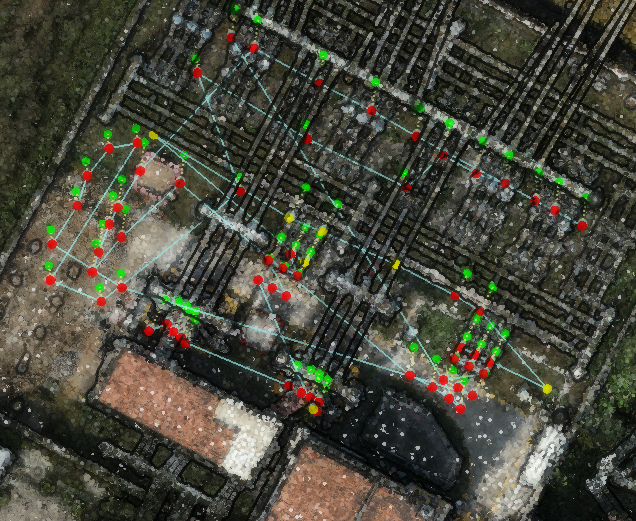 Initial Trajectory | 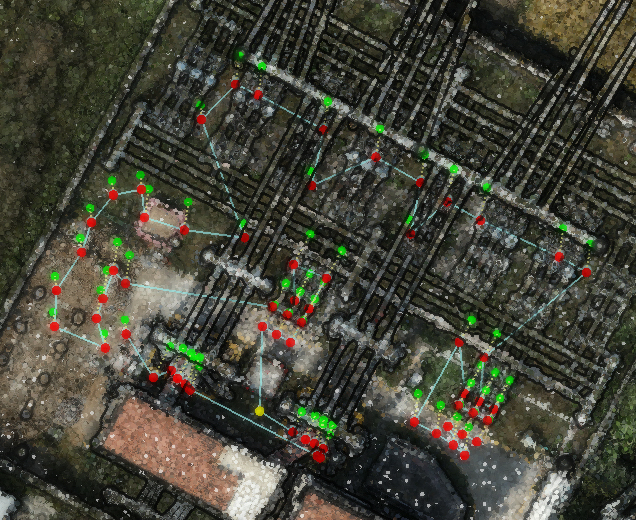 Auto Adjust Waypoint Order to Generate Trajectory |
Tip: You can adjust the corresponding waypoint order by dragging, right-click setting, etc. in the selected part point list on the right. A reasonable waypoint order is extremely important for the generation result.
Tip: Please ensure the safety of waypoints corresponding to selected part points. You can check Only Check Waypoints in the safety list to perform waypoint safety check.
Generate And Insert Waypoints
Generate waypoints based on selected part points and insert them into the specified trajectory segment.
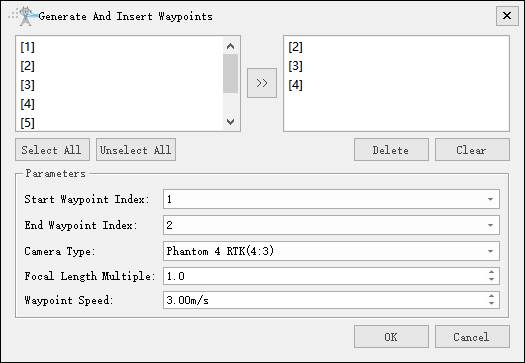
- Start Waypoint Index: Set the start waypoint index of the inserted trajectory segment.
- End Waypoint Index: Set the end waypoint index of the inserted trajectory segment.
- Camera Type: Set the photo camera type.
- Focal Length Multiplie: Default 1, setting range 1~40.
- Waypoint Speed: Default 3, setting range 1~99.
Generate 3DGS Data Collection Trajectory
Automatically generate three modes of 3D Gaussian data collection trajectories based on auxiliary lines.
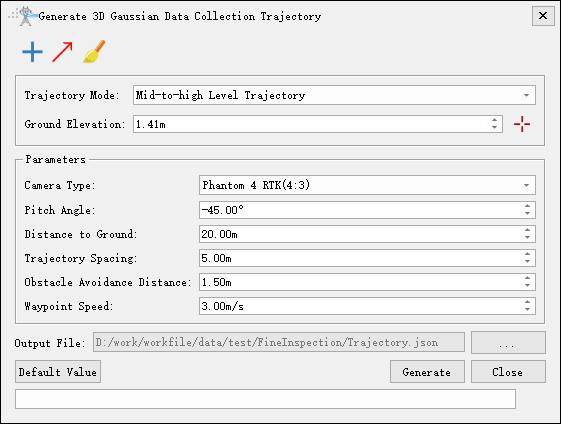
- Ground Elevation(m): Set the ground elevation value. Click
 to pick it in the scene.
Draw Boundary

Draw the planning boundary of medium and high altitude trajectory in the scene.
Draw Auxiliary Line

Draw auxiliary lines in the scene to determine the trajectory direction.
Clear

Clear the boundary or auxiliary lines drawn in the scene.
Medium And High Altitude Trajectory
Automatically generate the medium and high altitude trajectory based on the drawn boundary and auxiliary lines. You need to draw the boundary, auxiliary lines and ground elevation first before generating the trajectory.
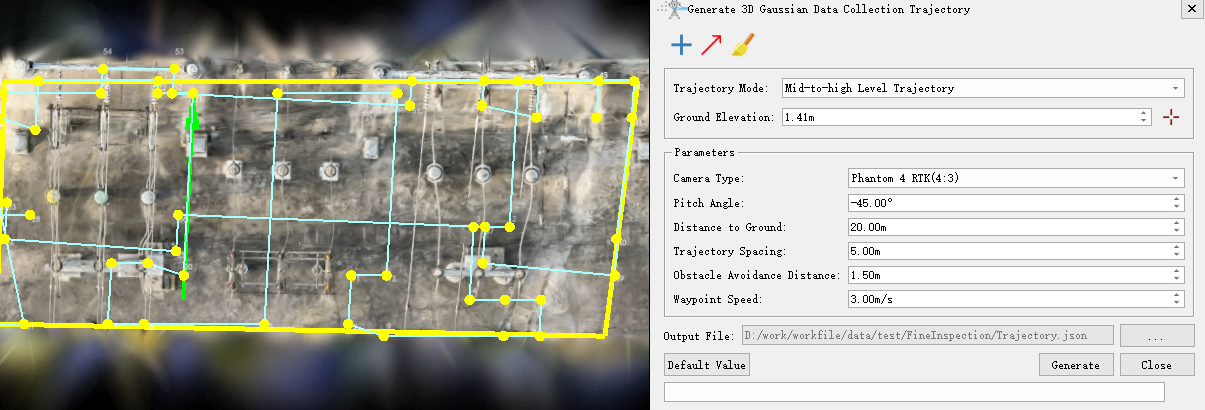
- Camera Type: Set the photo camera type.
- Pitch Angle: Set the pitch angle.
- Distance to Ground(m)(default is "20.00"): Set the distance to ground.
- Trajectory Spacing(m)(default is "2.00"): Set the trajectory spacing.
- Obstacle Avoid Distance(m)(default is "1.50"): Set the obstacle avoid distance.
- Waypoint Speed(m/s)(default is "3.00"): Set the waypoint speed.
Low Altitude Single Side Trajectory
Automatically generate the low altitude single side trajectory based on the drawn auxiliary lines. You need to draw the auxiliary lines and ground elevation first before generating the trajectory.
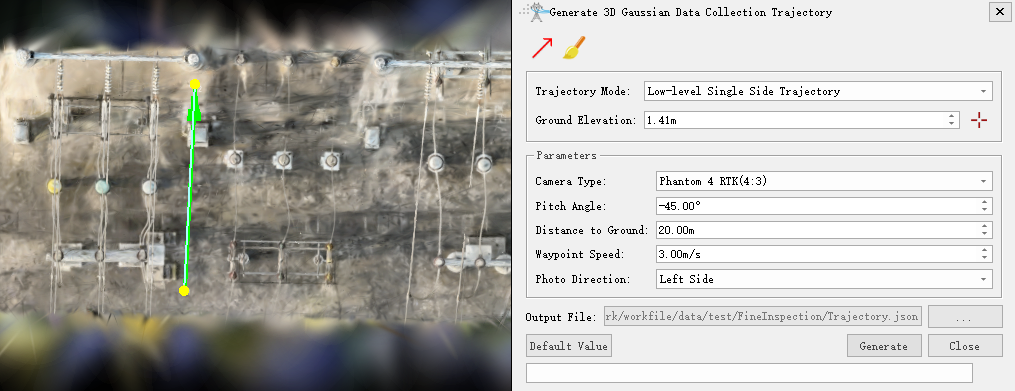
- Camera Type: Set the photo camera type.
- Pitch Angle: Set the pitch angle.
- Distance to Ground(m)(default is "2.00"): Set the distance to ground.
- Waypoint Speed(m/s)(default is "3.00"): Set the waypoint speed.
- Photo Direction: Set the photo direction.
Low Altitude Double Side Trajectory
Automatically generate the low altitude double side trajectory based on the drawn auxiliary lines. You need to draw the auxiliary lines and ground elevation first before generating the trajectory.
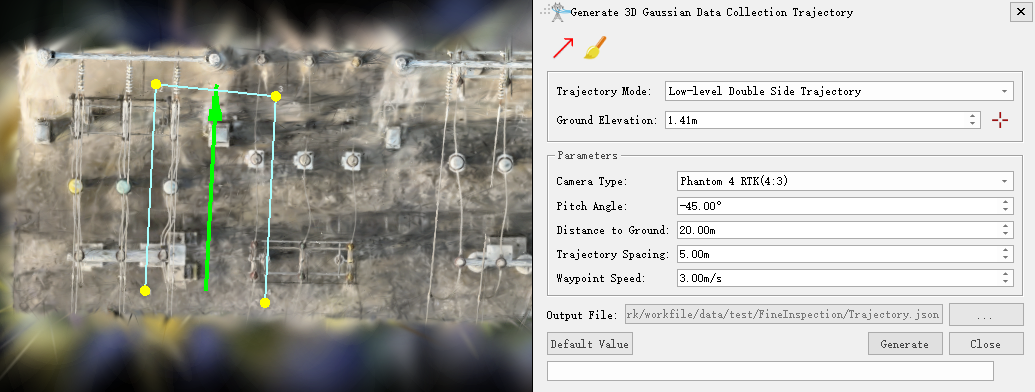
- Camera Type: Set the photo camera type.
- Pitch Angle: Set the pitch angle.
- Distance to Ground(m)(default is "2.00"): Set the distance to ground.
- Trajectory Spacing(m)(default is "2.00"): Set the trajectory spacing.
- Waypoint Speed(m/s)(default is "3.00"): Set the waypoint speed.
Low Altitude Vertical Plane Trajectory
Automatically generate the low altitude vertical plane trajectory based on the drawn boundary and auxiliary lines. You need to draw the auxiliary lines and ground elevation first before generating the trajectory.
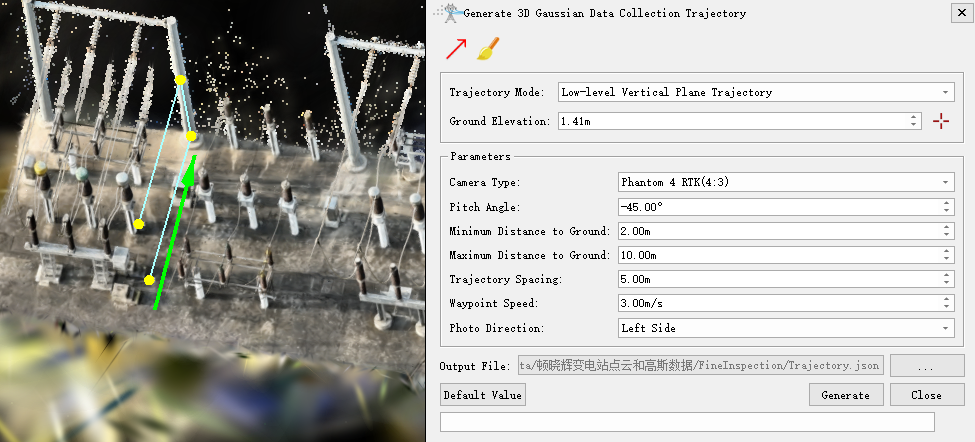
- Camera Type: Set the photo camera type.
- Pitch Angle: Set the pitch angle.
- Minimum Distance to Ground(m)(default is "2.00"): Set the minimum distance to ground.
- Maximum Distance to Ground(m)(default is "10.00"): Set the maximum distance to ground.
- Trajectory Spacing(m)(default is "2.00"): Set the trajectory spacing.
- Waypoint Speed(m/s)(default is "3.00"): Set the waypoint speed.
- Photo Direction: Set the photo direction.
Connect

Connect to main trajectory.
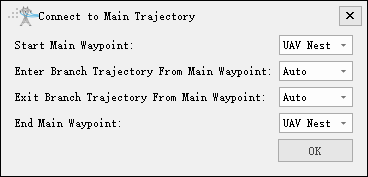
- Start Main Waypoint: Drone nest (default), or you can select other main waypoints.
- Enter Branch Trajectory from Main Waypoint: Auto (default), or you can select other main waypoints.
- Exit Branch Trajectory from Main Waypoint: Auto (default), or you can select other main waypoints.
- End Main Waypoint: UAV Nest (default), or you can select other main waypoints.
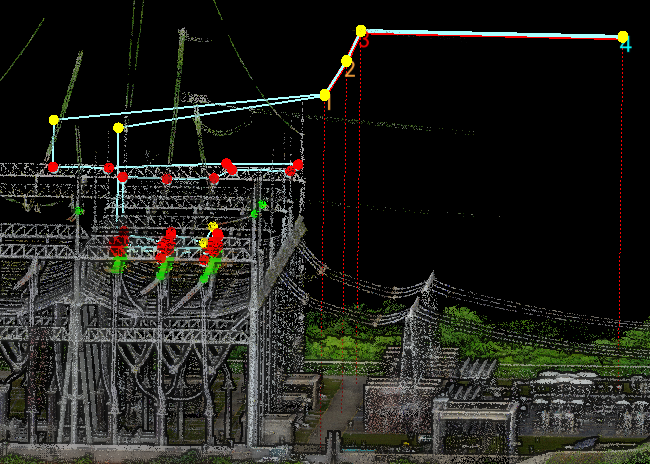
Edit

Edit the entire trajectory, you can translate, rotate, and symmetrize all part points and waypoints in a trajectory.
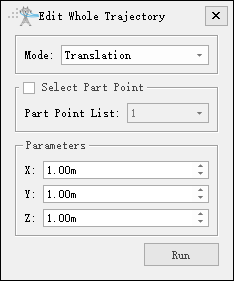
- Mode
- Translation: Translate all part points and waypoints.
- Rotation: Check Select Part Point to rotate around the corresponding part point; uncheck Select Part Point to rotate around the current trajectory center.
- Symmetry: Symmetrize with the midpoint between the selected part point and the left-click selected point as the center point.
- Select Part Point: Select part points, unchecked by default. When checked, you can select from the part point list.
- Parameters
- X: Set X-axis translation distance.
- Y: Set Y-axis translation distance.
- Z: Set Z-axis translation distance.