
Safety

The "Safety" function can check the obstacle avoidance distance between the trajectory and point cloud data, as well as the safe distance between waypoints. If distance is greater than "Obstacle Avoidance Distance", the list will be displayed in red, and the trajectory in the point cloud will also be displayed in red. Double-click the list item to locate the corresponding trajectory, adjust it by editing the trajectory or adding auxiliary waypoints, and then refresh.
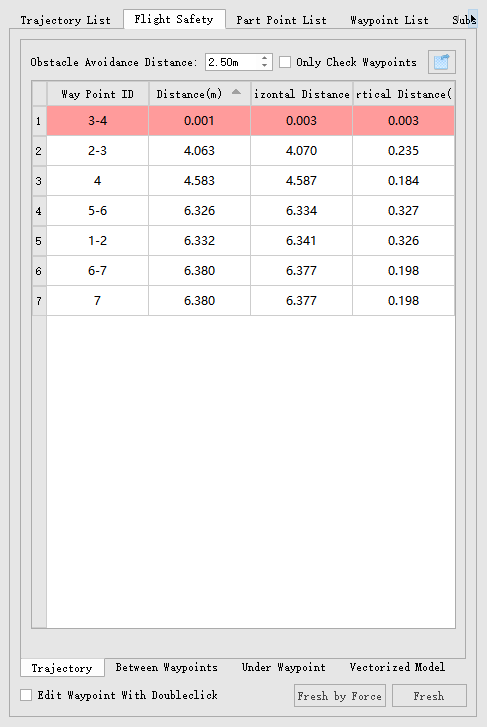
- Obstacle Avoidance Distance: The minimum distance between the trajectory and the point cloud data.
- Only Check Waypoints: If checked, only analyze the safety of the waypoint.
- Export dangerous results in the safety table: Click
 to export dangerous results.
- Trajectory: Check the minimum distance between the trajectory and the point cloud.
- Between Waypoints: Check the distance between adjacent waypoints, which cannot be less than 0.5 meters, with the software default being 1 meter.
- Under Waypoints: In substation inspection, detect the minimum distance below the waypoint and the point cloud. A distance too close below the waypoint may cause the drone to mistakenly think it is about to land, resulting in hovering or landing.
- Vectorized Model: In substation inspection, trajectories generated using models created from account data can check safety with the model. The obstacle avoidance distance is set when generating the model.
- Double-click to Edit Waypoint: When checked, double-clicking a waypoint enters the waypoint editing function.
- Fresh by Force: Perform a forced refresh after adjusting the waypoints.
- Fresh: Refresh after adjusting the waypoint.