
Set Projection Mode

Brief: Select projection mode(orthographic/perspective).
Steps
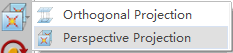
- After clicking this button, the option of projection mode is popped up. If Orthogonal Projection is selected, current active window will be set in orthogonal projection. If Perspective Projection is selected, current active window will be set in perspective projection.
Settings
- Shortcut Key: F3
Note: This tool is only for viewer in 3D mode.