
Measure Sag
Summary

This function is used to measure sag. Mainly used for measuring the sag of wires, shield wires, and drainage threads.
Usage
Click Measurement > Measure Sag
Parameters
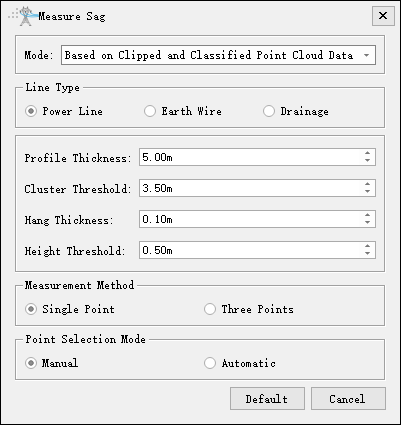
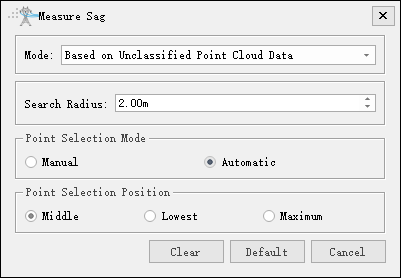
- Mode: By default, measurement is based on the point cloud after clipping and classifying. You can also choose to measure based on the original point cloud. When measuring based on the original point cloud, there is no restriction on line types. However, when measuring based on the point cloud after clipping and classifying, only the following three line types are supported: power line, shield wire, and drainage thread.
- Line Type: Default is power line, select the target line type for calculation (power line, shield wire, drainage thread).
- Profile Thickness(meters)(default value is "5.0"): The thickness of the cross-section of the line is used to extract a single wire point cloud.
- Cluster Threshold (meters)(default value is "3.5"): When clustering point cloud data, the maximum spatial interval distance is used. Power line points below this threshold will be clustered together.
- Hang Thickness(meters)(default value is "0.1"): The thickness of the point cloud cross-section near the hanging point is used to extract the hanging point.
- Height Threshold (meters)(default value is "0.5"): Measure the maximum height difference of the line point cloud of the measured object. If the height difference of the slice is greater than this threshold, it is considered that there are hanging points or other types of point clouds in the slice.
- Search Radius(Meter) (default value is "2.0"): Search range used to search for nearby point clouds at the suspension point.
- Measurement Method: Defaults to single point. In single point mode, simply select the point to be measured and its sag is calculated automatically. In three points mode, sequentially select the small-side hanging point, the large-side hanging point, and the measurement point to calculate the sag at the measurement point.
- Point Selection Mode: Defaults to manual. In manual mode, the sag of the manually selected point is calculated. In automatic mode, you first select an automatic calculation position (middle point, lowest point, or maximum sag point), and the sag is then calculated at that position on the corresponding line.
- Point Selection Position: The default is the midpoint. Select the location for automatic calculation.
- Middle: The midpoint of the line.
- Lowest: The lowest point of the line elevation.
- Maximum: The maximum point of line sag.
Steps
- For clipped and classified point clouds, after enabling the sag measurement tool, select the line type of the object to be measured, adjust the parameters. When the measurement method is single point, clicking the point to be measured will automatically calculate the sag of the measurement point. When the measurement method is three points, you need to sequentially click to select the small side hanging point, the large side hanging point, and the measurement point to calculate the sag of the measurement point.
- For original point clouds, after enabling the sag measurement tool, select the point selection mode. If manual mode is selected, you need to sequentially click to select the small side hanging point, the large side hanging point, and the measurement point to calculate the sag of the measurement point. If automatic mode is selected, you need to select the automatic calculation position (middle point, lowest point, maximum sag point), and then calculate the sag of the selected position of the line corresponding to the selected point.