
Merge Point Cloud and Vector Data
Summary

Merge the input point cloud and vector data, and generate the point cloud in the specified format. This function is used to improve the point cloud quality when the power line point cloud is thin or partially missing. The function interface is shown in the figure below. This function can process multiple data simultaneously. Click  to add the data to be processed. Click
 to remove the selected data. Click
 to clear the data list.
Usage
Click Toolbox > Point Cloud Processing > Merge Point Cloud and Vector Data
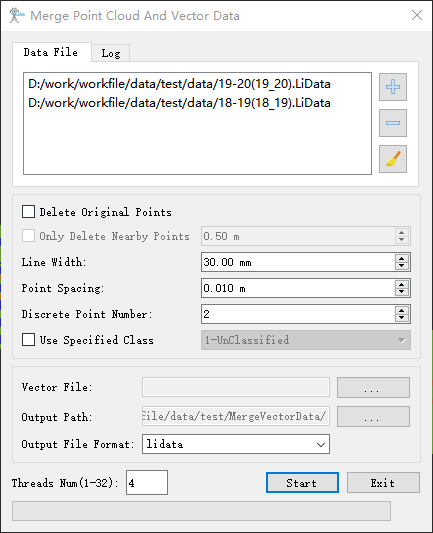
Settings
- Delete Original Points: Unchecked by default. If this option is checked, the newly generated point cloud will not contain the power line class points in the original data; otherwise, the power line points in the original data will be kept.
- Only Delete Nearby Points (meter) (default value is "0.5"): Unselected by default. If selected, only delete original points of the corresponding cdlass within the specified 3D radius betwveen the two endpoints of the vector line.
- Line Width (millimeter) (default value is "30"): The width of the power line generated from the vector data.
- Point Spacing (meter) (default value is "0.01"): The spacing of each two adjacent power line points generated from the vector data.
- Discrete Points Number (default value is "10"): The discrete points number generated for each point in the vector data. The larger this value is, the more dense the result point cloud will be.
- Use Specified Class: If checked, only the specified category is used for merging, and other categories are output normally.
- Vector File: Set the path of the vector file.
- Output Path: Set the path of output file.
- Output File Format: The output format of the result, supporting lidata and las format.
- Threads Num (default value is "4"): Set the number of threads (1 to 32) to run this function. The software can record the current settings and when the user opens this function again, the setting will be kept.