Merge/Split Trajectory Files
Summary

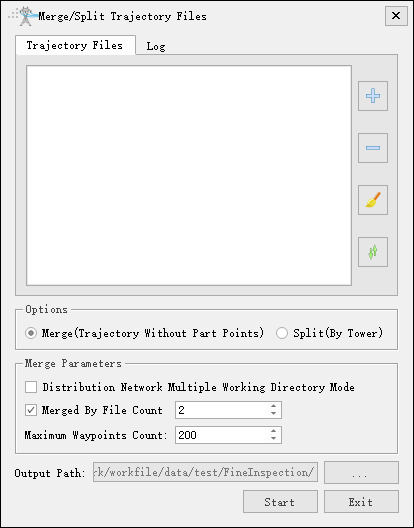
Merge and split distribution network trajectory files in different ways. Click to add trajectory files. Click
 to remove the selected vector data(remove the first record of the list if no data is selected). Click
 to clear data list. Click
 to sort the trajectory files by tower names.
- Options:
- Merge(Trajectory Without Part Points): Merge multiple trajectory files in the order of the file list, and the merged number of waypoints should not exceed the maximum number of waypoints.
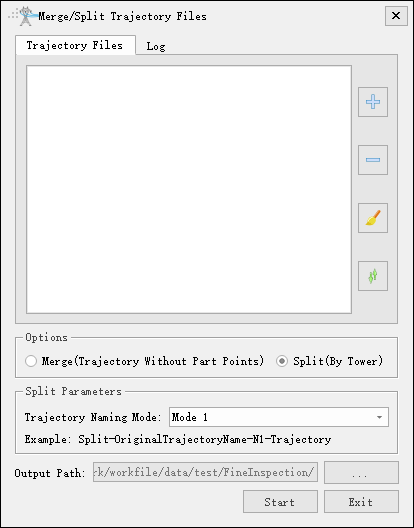
- Split(By Tower): Split the trajectory according to the principle of the closest horizontal distance between the waypoint and tower position, and save the trajectory file in the output directory.
- Merge Parameters:
- Distribution Network Multiple Working Directory Mode: Unchecked by default. When checked, it enters multi-working directory mode, allowing you to select a root directory to automatically search for and add trajectory files from various branch working directory.
- Merge by File Count(Default value "2"): Selected by default. If unchecked, files will not be merged by file count.
- Maximum Waypoints Count: Set the maximum number of merged waypoints, and when it exceeds the maximum number of waypoints, the log will prompt and output.
- Distribution Network Multiple Working Directory Mode: Unchecked by default. When checked, it enters multi-working directory mode, allowing you to select a root directory to automatically search for and add trajectory files from various branch working directory.
- Output Path: When merging, set the path to the merged file. When splitting, set the output folder.