
Configuration File Operation

Brief: View and change the camera settings of the currently active 3D view.
Step
- Click the
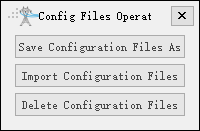
 button on the left toolbar of the software interface, and then click the button in the pop-up menu to open the following interface:
Parameter Settings
- Save Configuration File As: Save all configuration files to another folder.
- Import Configuration Files: Import configuration files from the selected folder.
- Delete Configuration Files: Delete configuration files.