
Individual Tree Segmentation
Summary

Perform individual tree segmentation for the input point cloud data. The function interface is shown in the figure below. This function can process multiple data at the same time. Click  to add the data to be processed. Click
 to remove the selected data. Click
 to clear the data list.
Usage
Click Toolbox > Point Cloud Processing > Individual Tree Segmentation
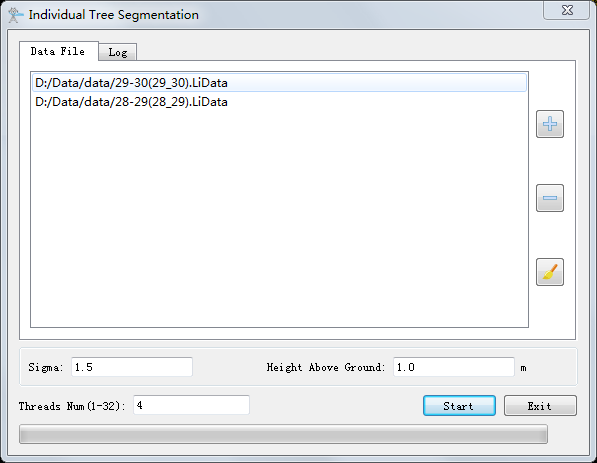
Settings
- Sigma (default value is "1.5"): Individual tree segmentation smoothing coefficient. If there are too many trees, increase the smoothing factor, otherwise, decrease the smoothing factor.
- Height Above Ground (meter) (default value is "1.0"): Point clouds above ground by distances greater than this value are used for individual tree segmentation, and less than this value will not be segmented.
- Threads Num (default value is "4"): Set the number of threads (1 to 32) to run this function. The software can record the current settings and when the user opens this function again, the setting will be kept.
Note: If the point cloud has been segmented, user must clear the result of individual tree segmentation before redoing the segmentation.