
Manipulator Setting

Brief: Set the mouse sensitivity.
Step
- Click the
 button on the left toolbar of the software interface, and then click the button in the pop-up menu to open the following interface:
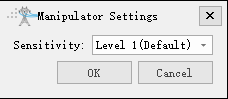
Parameter Settings
- Select Sensitivity: The sensitivity is divided into levels 1, 2, and 3, with higher levels indicating higher sensitivity. The default level is 1.