
Convert Lidata To Las
Summary

The classify function can be used to convert Lidata files to las files. The noise categories can be removed from the point cloud file. Meanwhile, the input data can be merged and output. The function interface is shown in the following figure. This function can process multiple data simultaneously. Click  to add data to be processed, click
 to remove selected data, and click
 to clear the data list.
Usage
Click Toolbox > Point Cloud Processing > Convert Lidata To Las
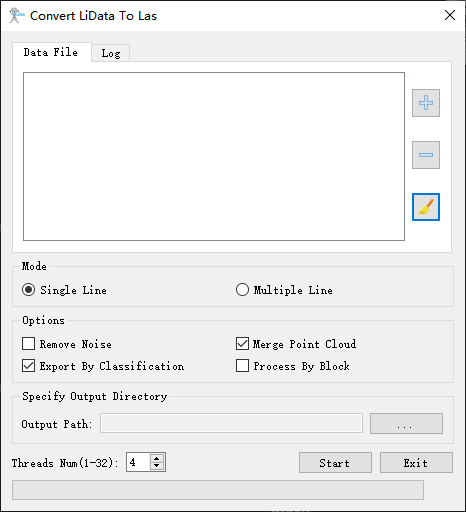
Parameter Settings
Mode
- Single Line (default mode):Once checked, this function is used to process single LiData file. You should add single LiData file to the Data File List.
- Multiple Line:Once checked, this function is used to process multiple work directory. You should select the base directory of multiple working directory, then the target LiData files will be added to Data File List automatically.
Options
- Remove Noise: Once checked, the noise categories will be removed.
- Merge Point Cloud: Once checked, this function will export an additional las file that merges the input point cloud.
- Export by Category: Once checked, the function will export the point cloud by category. Each category will correspond to a las file.
- Process by Block: Once checked, the function will process the point cloud by block. This option is recommended when the input point cloud is very large to avoid memory problems.
Specify Output Directory: If this option is checked, the output file will be generated in the specified directory. If it is not checked, output files will be generated in the peer directory of the input file.
Threads Num(4 by default):Set the number of running threads of the function, which can support 1-32 threads. The software can record the user's current setting and automatically restore the setting when it is opened again.