
Waypoint List
The waypoint list displays information such as waypoint index, part point index, emergency return point checkbox, and waypoint speed. Through the right-click menu, operations such as Delete, Merge, Split, Reverse Order, Auto Set Emergency Return Point, Open Photo Folder, Reverse Select, and Search can be performed on waypoints.
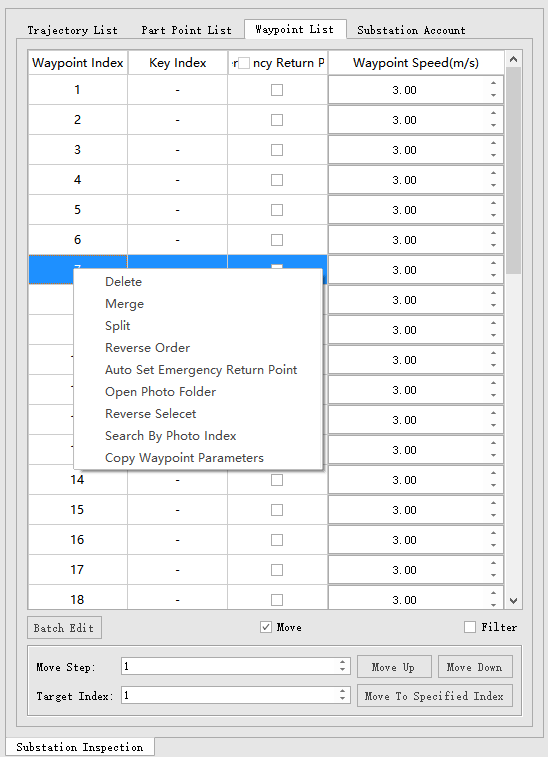
- Delete: Delete waypoints.
- Merge: Merge multiple selected waypoints into one waypoint.
- Split: Split a multi-photo waypoint into multiple single-photo waypoints, arranged in photo-taking order.
- Reverse Order: Reverse the order of selected adjacent waypoints.
- Auto Set Emergency Return Point: Automatically analyze whether there are obstacle point clouds above the waypoint based on the detection radius. If not, the selected waypoint will automatically have the emergency return point checkbox checked.
- Open Photo Folder: Automatically open the photo folder based on the archived photo directory.
- Reverse Select: Reverse the selection of waypoints.
- Search by Photo Index: Search waypoints by photo index.
- Copy Waypoint Parameters: Copy the parameters of the reference waypoint to the selected waypoints.
- Batch Edit: Consistent with the batch edit function in batch tools.
- Move: Check to move waypoint order.
- Move Step: The number of positions to move at once.
- Move Up And Move Down: Direction of waypoint movement.
- Target Index: The specific waypoint index to move the waypoint to.
- Move To Specified Index: Button to move to the specified index.
- Filter: Check to filter waypoints by searching keywords in the part point name field.