
Shield Line Vectorization
Shield Line Vectorization Toolbar is as below, including Three Points Fitting Single Shield Line and Batch Fitting Shield Lines.
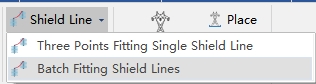
Three Points Fitting Single Shield Line

Manually pick up three points on shield line and vectorize shield line. The operation steps are as below:
- Left click to pick up shield line end point, or right click to end fitting shield line by three points.
- Left click to pick up another end point or right click to go back to step1.
- Left click to pick up middle point of the shield line or right click to go back to step2.
- Finish fitting. And repeat former steps.
Batch Fitting Shield Lines
For multiple segment shield line data, batch vectorization of shield lines.
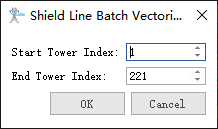
- Start Tower Index: Set start tower index.
- End Tower Index: Set end tower index.