
Generate Distribution Network Trajectory From Model
Summary

Batch generate distribution network trajectory based on the trajectory model, supporting two modes for tower selection: arbitrary selection or selection by tower section.
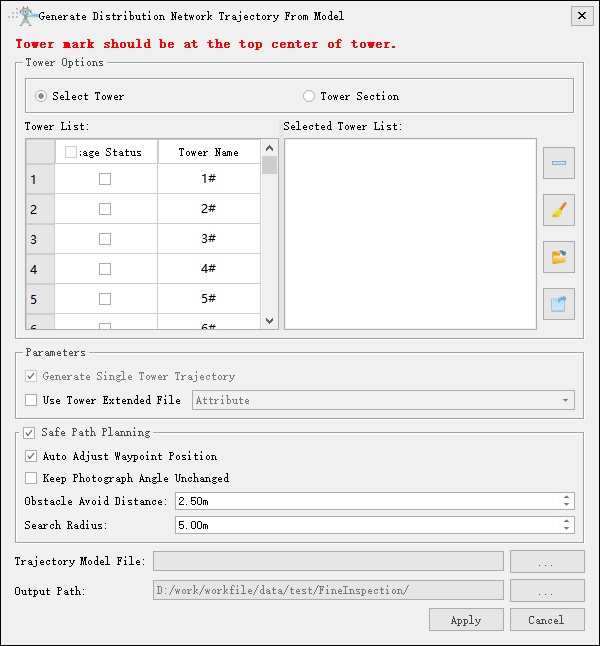
- Select Tower: Select specified towers to extract key points, supporting deletion, clearing, saving, and importing of the selection results.
- Tower List: Supports checkbox selection and double-click. Checking adds the tower to the selected tower list, and double-clicking locates the tower in the scene.
- Selected Tower List: Displays the list of selected towers, supporting deletion, clearing, exporting the selected tower files, and importing tower files.
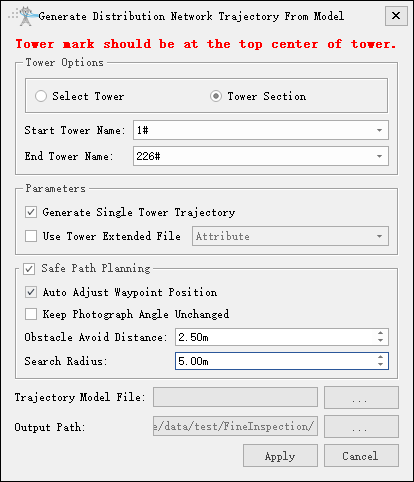
- Tower Section: Select tower by tower section.
- Start Tower Index: Set the starting tower index.
- End Tower Index: Set the end tower index.
- Parameters
- Generate Single Tower Trajectory: If checked, generate corresponding single tower trajectory based on the starting and ending towers; If unchecked, generate a single trajectory.In tower selection mode, only single tower trajectory can be generated, and this option is disabled.
- Use Tower Extended File: Not checked by default. If selected, tower extension attributes will be specified, and the model file will be retrieved from the trajectory model file directory based on the attribute values.
- Safe Path Planning: Set whether to perform safe path planning.
- Auto Adjust Waypoint Position: Set whether to automatically adjust waypoint positions.
- Keep Photograph Angle Unchanged: Set whether to keep the camera angle unchanged.
- Obstacle Avoid Distance(m)(default value "2.5"): Set the obstacle avoidance distance.
- Search Radius(m)(default value "5"): Set the search radius.
- Trajectory Model File: Select trajectory model .dtm file, used when the "Use Tower Extension File" option is not checked.
- Trajectory Model Directory: Select trajectory model .dtm file, used when the "Use Tower Extension File" option is checked.
- Trajectory File: If "Generate Single Tower Trajectory" is checked, set distribution network trajectory folder; If "Generate Single Tower Trajectory" is unchecked, set distribution network trajectory path.