
Adjust Point Cloud Position By Classification
Function Overview

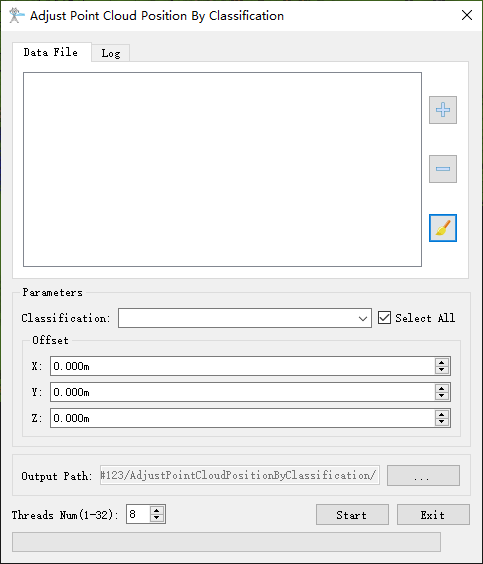
This function can be used to adjust the position of point clouds in specified categories. The function interface is shown in the figure below.
Usage
Click Toolbox > Point Cloud Processing > Adjust Point Cloud Position By Classification
 ;
Parameter Settings
- Classification: Select the point cloud classification to be adjusted, default is all selected.
- Offset: Specify the offset of point cloud coordinates in XYZ axis directions, in meters.
- Output Path: Specify the output directory for the point cloud after position adjustment.
- Threads Num (default: "8"): Set the number of threads for function operation, supporting 1-32 threads. The software can remember the user's current settings and automatically restore them when reopened.
Steps
1. Add the point cloud file whose position needs to be adjusted;
2. Adjust the offset parameters;
3. Click the "Start" button to perform coordinate adjustment and output the result file in the specified output directory.