
Panorama
The panorama menu is shown in the figure below, including Add, Auto, Linkage, Previous Frame, Next Frame, Select Frame, Node, View and Jump functions.
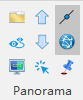
Add

Load the panoramic list and open the panoramic window, supporting *.imglist format.
Auto

Automatically roam the scene based on the trajectory.
Linkage

Window linkage.
Previous Frame

Navigate to the previous frame.
Next Frame

Navigate to the next frame.
Select Frame

Select a frame node and navigate to a specific frame.
Node

Show frame node.
View

Show the panoramic view.
Jump

Pick a target point in the 3D window. The panoramic window will navigate to the corresponding node and adjust the perspective to aim at that target point.