
Extract by Serial Time
Summary
Extract by Serial Time tool helps the user to extract the points in customized GPS time period and save them to a separate file.
Usage
Click Data Management > Extract > Extract by Serial Time.
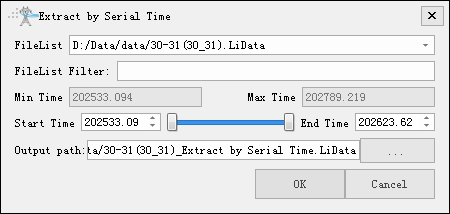
Settings
- File List: Select the file to be processed from the file list.
- File List Filter: Automatically select files to be processed based on the fields entered by the user.
- Min Time: Display the minimum GPS time value in the point cloud file selected by the user. This value does not require user settings.
- Max Time: Display the maximum GPS time value in the point cloud file selected by the user. This value does not require user settings.
- Start Time (default value is "Min Time"): Input the minimum GPS time value of the point cloud data to be extracted.
- End Time (default value is "Max Time"): Input the maximum GPS time value of the point cloud data to be extracted.
- Output Path: The path of the output file.