
Generate Trajectory
Summary
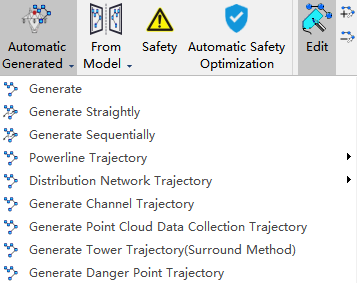
Automatic Generation

Automatic generation is to generate trajectory according to the inspection configuration. The drop-down menu also includes functions such as "Generate", "Generate Straightly", "Generate Sequentially", "Powerline Trajectory", "Distribution Network Trajectory", "Generate Channel Trajectory", "Generate Point Cloud Data Collection Trajectory", "Generate Tower Trajectory(Surround Method)", etc.
Automatic Generated
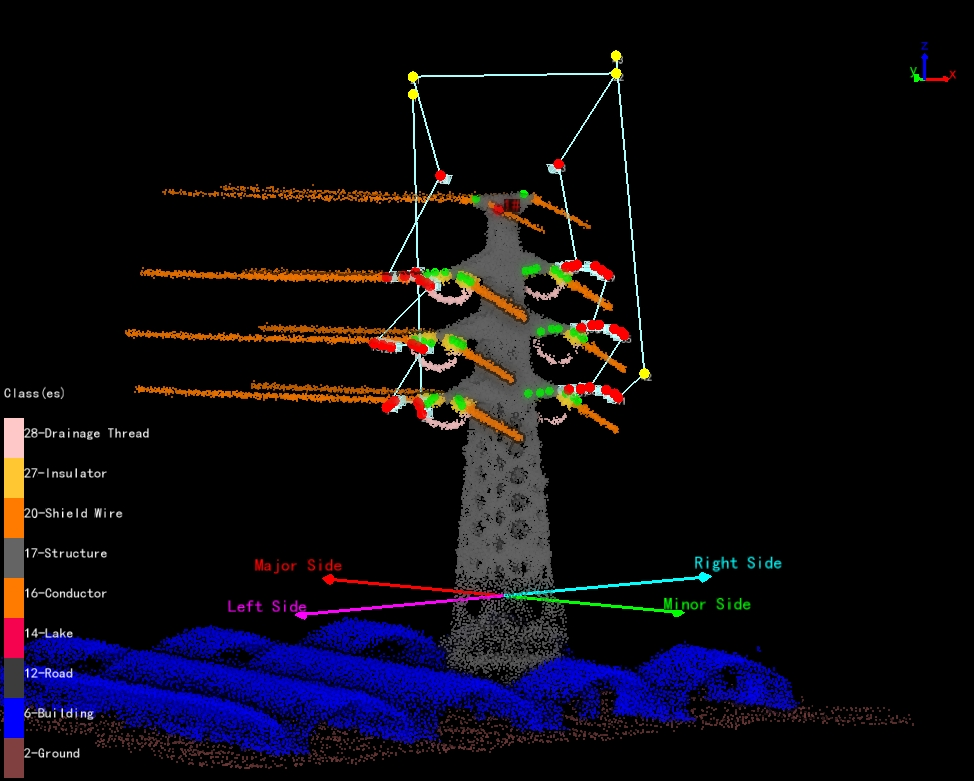
Automatically generate fine inspection trajectory for towers based on inspection configuration. After clicking the button, set the camera type and waypoint speed, and click "Apply" to automatically generate the trajectory.
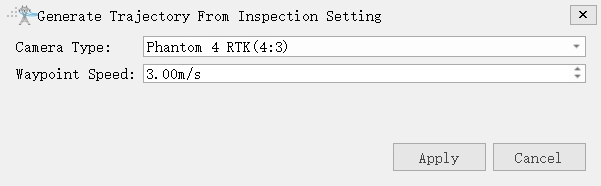
- Camera Type: Select camera type for taking photos. Add a new camera type in the camera configuration.
- Waypoint Speed(m/s)(default value is "3.0"): Set waypoint speed.
Generate

Automatically generated based on inspection configuration and shortest path principle.
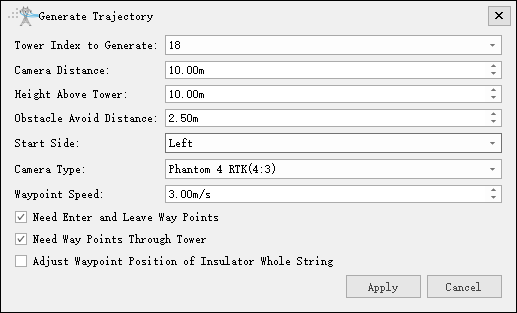
- Tower Index to Generate: The tower index needs to generate the trajectory.
- Camera Distance(m)(default value is "10"): The shooting distance from the waypoint to the part point.
- Height Above Tower(m)(default value is "10"): Height above tower.
- Obstacle Avoid Distance(m)(default value is "2.5"): Distance for obstacle avoidance detection.
- Start Side(default value is "Left"): Waypoint shooting starting side.
- Camera Type: Select camera type for taking photos. Add a new camera type in the camera configuration.
- Waypoint Speed(m/s)(default value is "3.0"): Set waypoint speed.
- Need Enter and Leave Way Points(Checked by default): Add two auxiliary points for exiting the tower and entering the tower.
- Need Way Points Through Tower(Checked by default): Add auxiliary points for passing the tower.
- Adjust Waypoint Position of Insulator Whole String: Not checked by default. If checked adjust the waypoint position of the whole insulator string according to the camera field of view.
Generate Straightly

Generate flight trajectories directly by connecting parts points in order. There may be a possibility of the trajectory passing through the tower, and auxiliary waypoints need to be manually added.
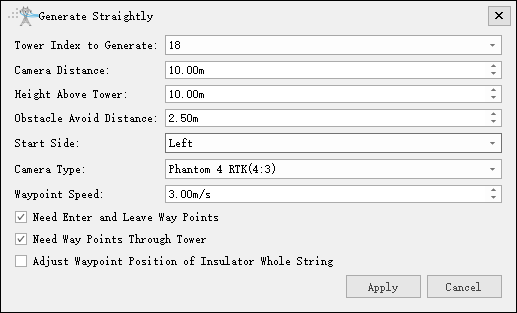
- Tower Index to Generate: The tower index needs to generate the trajectory.
- Camera Distance(m)(default value is "10"): The shooting distance from the waypoint to the part point.
- Height Above Tower(m)(default value is "10"): Height above tower.
- Obstacle Avoid Distance(m)(default value is "2.5"): Distance for obstacle avoidance detection.
- Start Side(default is "Left"): Waypoint shooting starting side.
- Camera Type: Select camera type for taking photos. Add a new camera type in the camera configuration.
- Waypoint Speed(m/s)(default value is "3.0"): Set waypoint speed.
- Need Enter and Leave Way Points(Checked by default): Add two auxiliary points for exiting the tower and entering the tower.
- Need Way Points Through Tower(Checked by default): Add auxiliary points for passing the tower.
- Adjust Waypoint Position of Insulator Whole String: Not checked by default. If checked adjust the waypoint position of the whole insulator string according to the camera field of view.
Generate Sequentially
Automatically generate trajectory based on inspection configuration and part point order.
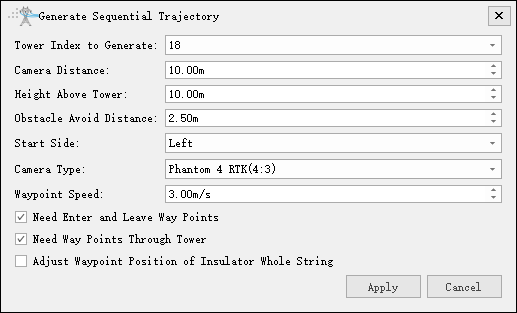
- Tower Index to Generate: The tower index needs to generate the trajectory.
- Camera Distance(m)(default value is "10"): The shooting distance from the waypoint to the part point.
- Height Above Tower(m)(default value is "10"): Height above tower.
- Obstacle Avoid Distance(m)(default value is "2.5"): Distance for obstacle avoidance detection.
- Start Side(default is "Left"): Waypoint shooting starting side.
- Camera Type: Select camera type for taking photos. Add a new camera type in the camera configuration.
- Waypoint Speed(m/s)(default value is "3.0"): Set waypoint speed.
- Need Enter and Leave Way Points(Checked by default): Add two auxiliary points for exiting the tower and entering the tower.
- Need Way Points Through Tower(Checked by default): Add auxiliary points for passing the tower.
- Adjust Waypoint Position of Insulator Whole String: Not checked by default. If checked adjust the waypoint position of the whole insulator string according to the camera field of view.
Batch Power Line Trajectory Generating

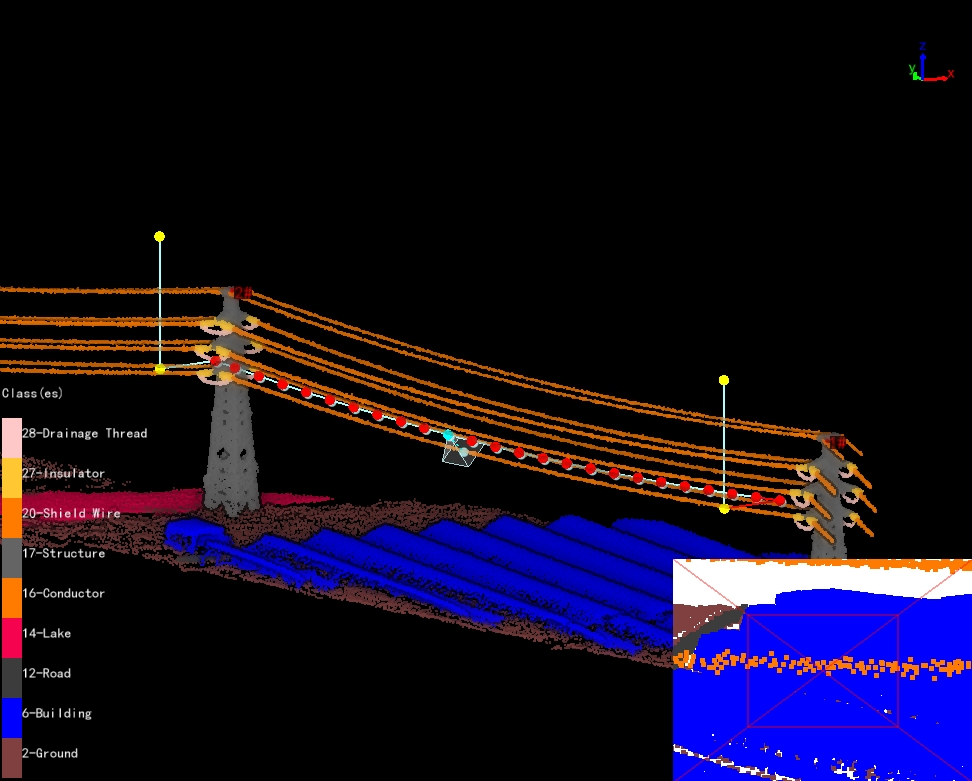
Batch generation of power line inspection trajectory(Add point cloud data or vector data to generate trajectory in batches).
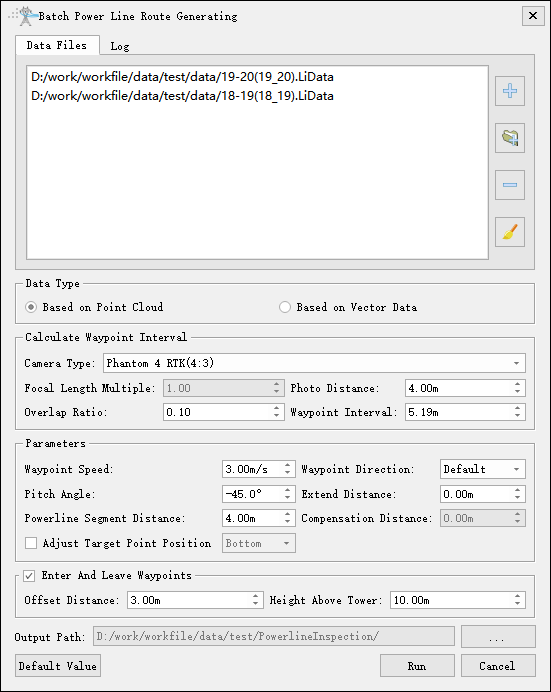
- Data Type:
- Based on Point Cloud: Generating trajectory based on point cloud.
- Based on Vector Data: Generating trajectory based on vector data.
- Calculate Waypoint Interval:
- Camera Type: Select camera type for taking photos. Add a new camera type in the camera configuration.
- Focal length multiple: Set the focal length multiple.
- Photo Distance(m)(default value is "4.0"): Set the photo distance.
- Overlap Ratio(default value is "0.1"): Set the overlap ratio of adjacent photos.
- Waypoint Interval(m)(default value is "0.5"): Set the distance between the waypoints and perform the safety inspection between the waypoints. Automatically calculate waypoint Interval when adjusting camera type, focal length multiple, photo distance, and overlap ratio.
- Parameters:
- Waypoint Speed(m/s)(default value is "3.0"): Set waypoint speed.
- Waypoint Direction: Set the position of the waypoint relative to the power line. When selecting "Default", the waypoint of the left phase is on the left side of power line, and the waypoint of the right phase is on the right side of power line. When selecting "Left Side", the waypoint is located on the left side of the power line; when selecting "Right Side", the waypoint is located on the right side of the power line.
- Pitch Angle(°)(default value is "-45.0"): Set the pitch angle of the shooting waypoint.
- Extend Distance(m)(default value is "0.0"): Set the extend distance. The starting and ending positions of the trajectory extend on both sides of the power line channel direction.
- Powerline Segment Distance(m)(default value is "4.0"): Set the clustering threshold and cluster the point cloud points.Only used for point cloud data.
- Compensation Distance(m)(default value is "0.0"): Set compensation distance. The vector line is located at the bottom of the power line point data. Used to compensate for the distance between vector lines and point clouds.Only used for vector data.
- Adjust Target Point Position: Adjust the position of the target point. Based on the classified point cloud data near the target point, fine-tune the target point's position on the power line. This function requires the point cloud to be classified first and is only applicable to position adjustments within a small range.
- Enter And Leave Way Points: Add two auxiliary points for entering the tower and leaving the tower.
- Offset Distance(m)(default value is "3.0"): Set horizontal offset distance.
- Height Above Tower(m)(default value is "10.0"): Set height above tower.
- Output Path: Set the output path of the trajectory.
- Default Value: Click "Default Value" to restore the initial parameters.
- Run: Click "Run" to start the calculation.
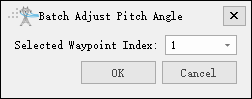
Batch Adjust Pitch Angle

Batch adjust the pitch angles of other waypoints based on the selected waypoint and the first and last waypoints.
Merge/Split Trajectory Files

Merge and split shield wire and power line trajectory.
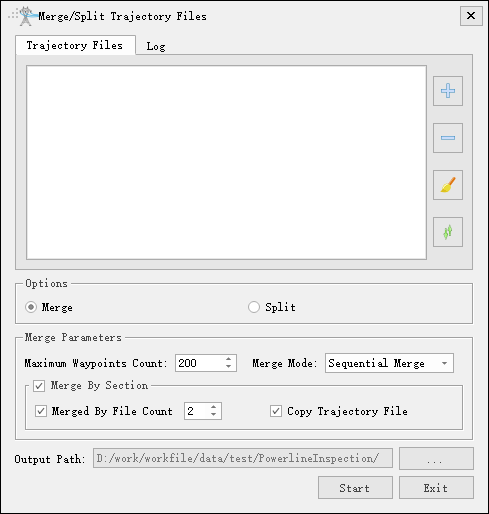
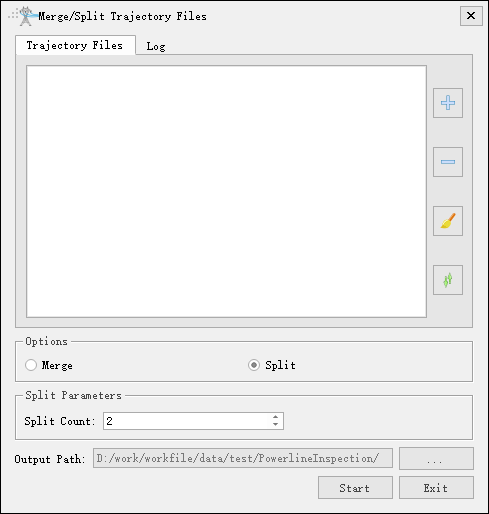
- Option: Check the "Merge" and "Split" options.
- Merge Parameters: Customize the maximum count of waypoints based on the maximum waypoints supported by the UAV. The merge mode supports two types: sequential merge and interval reverse merge. The merging function by section supports merging by the number of files. For example, if set to 2, two trajectories can be merged, and the waypoint count of merged trajectory cannot exceed the maximum count. If it exceeds, the merge will be abandoned. If "Copy Trajectory File" is checked, copy and output trajectory that do not meet the merging requirements.
- Split Parameters: Default 2, customizable.
- Output Path: Specify the path to save the file results.
Generate Distribution Network Trajectory
Generate Distribution Network Trajectory Model
Generate Distribution Network Trajectory From Model
Generate Distribution Network Trajectory Model
Generate Distribution Network Tower Trajectory(Surround Method)
Batch Copy Trajectory
Based on the existing single tower trajectory file, batch copy to other towers and generate corresponding trajectory files.
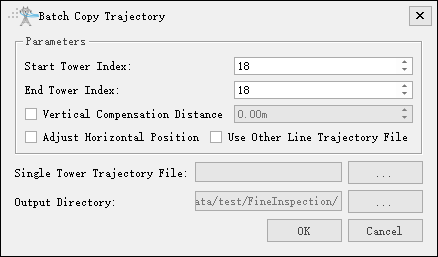
- Parameters
- Start Tower Index: Set the starting tower index.
- End Tower Index: Set the ending tower index.
- Vertical Compensation Distance(m): Sets the vertical compensation distance; this option is unchecked by default. When checked, the vertical compensation distance can be configured.
- Adjust Horizontal Position: Sets whether to adjust the horizontal position.
- Use Other Line Trajectory File: Sets whether to use trajectory files for other lines. If the selected "Single Tower trajectory File" does not belong to the current line, check this option and specify the corresponding LiTower-format tower file. Otherwise, leave it unchecked.
- Single Tower Trajectory File: Select an existing single tower trajectory file.
- Output Directory: Select output directory.
Generate Channel Trajectory
Generate Point Cloud Data Collection Trajectory
Generate Tower Trajectory(Surround Method)
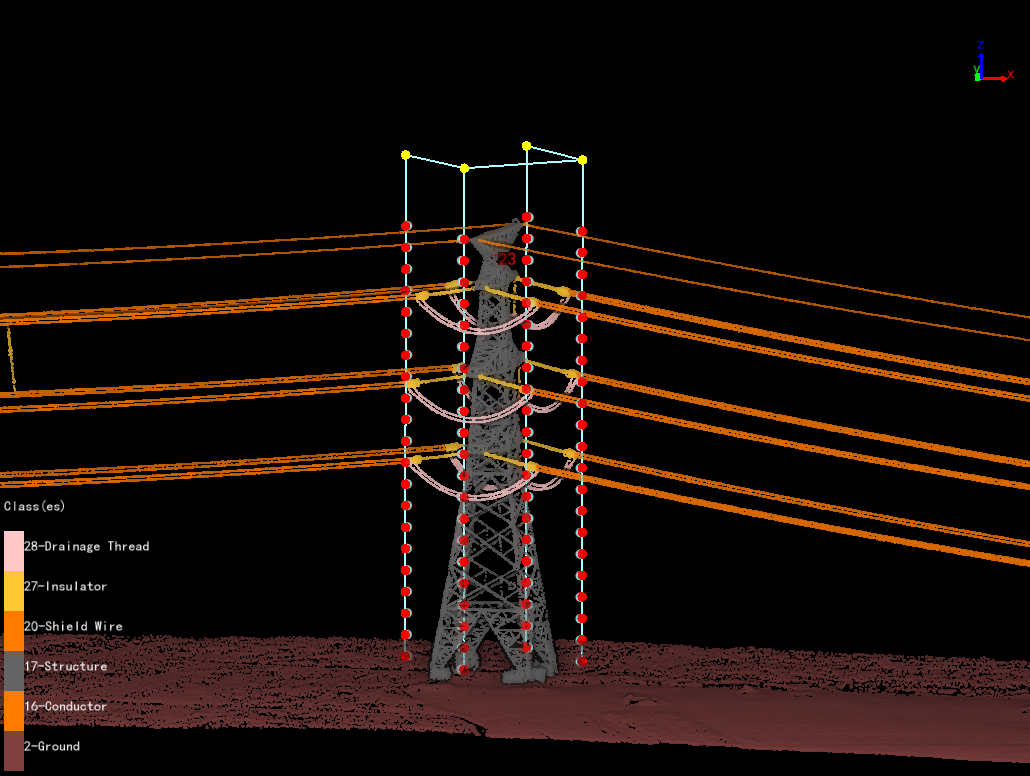
Automatically generate a panoramic shooting trajectory for the tower. The waypoints are located on the front, back, left, and right sides of the tower, and the number of waypoints on each side is determined by the vertical overlap rate. Each waypoint can take multiple photos, and the number of photos is determined by the horizontal overlap rate and camera type.
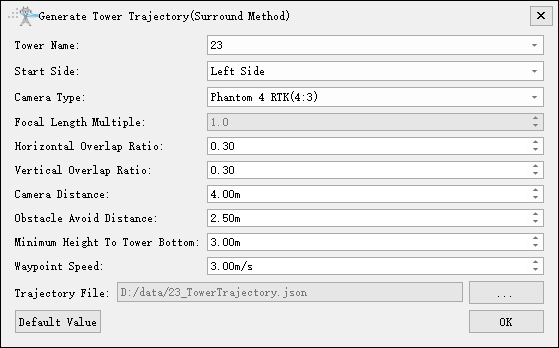
- Tower Name: Select the current tower name.
- Start Side(default value is "Left Side"): Waypoint shooting starting side.
- Camera Type: Select camera type for taking photos. Add a new camera type in the camera configuration.
- Focal Length Multiple: Set camera focal length.
- Horizontal Overlap Ratio(default value is "0.3"): The overlap rate of photos on the same side of the tower. It determines the number of photos on the current side.
- Vertical Overlap Ratio(default value is "0.3"): The overlap rate of waypoints on the same side of the tower. It determines the number of waypoints on the current side.
- Camera Distance(m)(default value is "4.0"): The closest distance from the waypoint to the tower point cloud box.
- Obstacle Avoid Distance(m)(default value is "2.5"): Distance for obstacle avoidance detection.
- Minimum Height To Tower Bottom(m)(default value is "3.0"): Minimum height from waypoint to ground point.
- Waypoint Speed(m/s)(default value is "3.0"): Set waypoint speed.
- Default Value: Click "Default Value" to restore the initial parameters.
Generate Danger Point Trajectory
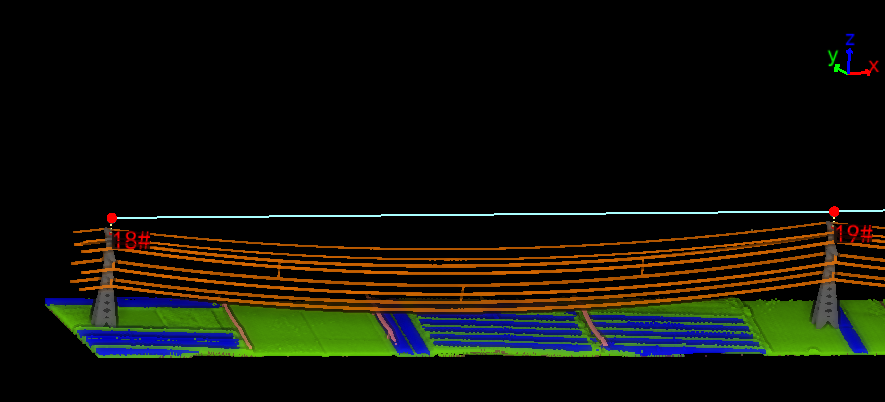
Generate an inspection trajectory above the danger points based on the danger point detection results.
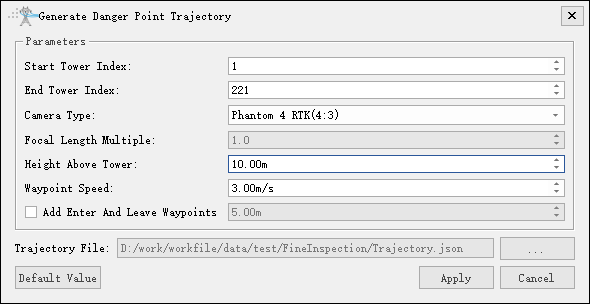
- Start Tower Index: Set the starting tower index.
- End Tower Index: Set the ending tower index (including the current tower). Camera Type: Set the type of camera used for photography.
- Camera Type: Set the type of camera used for photography.
- Focal Length Multiple: Set the focal length multiple of the photography camera.
- Height Above Tower(m)(default by "10.00"): Set the waypoint height when passing the tower (relative to the tower marker point).
- Waypoint Speed(m/s)(default by "3.00"): Set the flight speed.
- Add Tower Entry And Leave Points(m)(default by "5.00"): When checked, add entry and leave points at the start and end of the tower.